
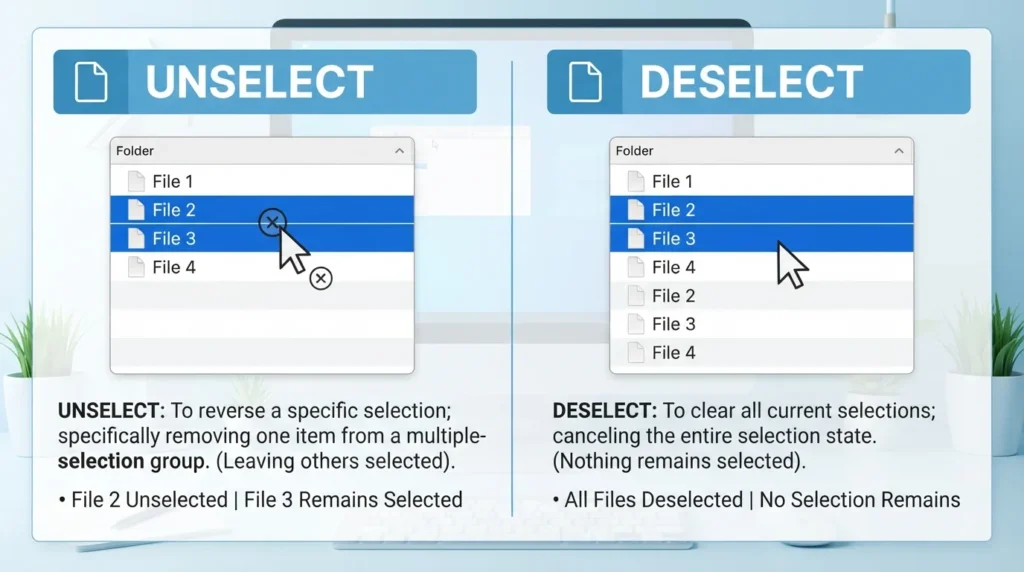
Quick Answer: Unselect vs. Deselect
Deselect means to remove a selection or stop something from being selected.
Click the checkbox again to deselect the option.
Unselect can also mean to remove a selection, but it is less consistently preferred and may sound less natural in some contexts.
The easiest rule
Deselect = the standard choice for removing a selection.
For most interface instructions, use:
Select → Deselect
rather than:
Select → Unselect
What Does “Deselect” Mean?
Deselect is a verb meaning to remove something from a selected state.
It is especially common in:
- Software
- Websites
- Mobile apps
- Forms
- Menus
- Graphic design
- Spreadsheets
- Databases
- User interfaces
Examples of “Deselect”
Click the checkbox to deselect the option.
Deselect all items before continuing.
The user accidentally selected the wrong file and then deselected it.
Click anywhere outside the image to deselect it.
🎯 Key Insight: In digital interfaces, deselect is the clearest standard term for removing a selection.
What Does “Unselect” Mean?
Unselect can mean to remove something from a selected state.
For example:
Unselect the items you don’t want to include.
The meaning is understandable, and the word appears in real-world software and technical usage.
However, unselect is generally less preferred than deselect when you’re describing a standard user-interface action.
Examples
Unselect the checkbox if you don’t want notifications.
You can unselect any item before submitting the form.
These sentences are understandable, but many editors would choose:
Deselect the checkbox if you don’t want notifications.
You can deselect any item before submitting the form.
🎯 Key Insight: Unselect is understandable and used in practice, but deselect is usually the better default.
Deselect vs. Unselect: Main Difference
| Feature | Deselect | Unselect |
|---|---|---|
| Meaning | Remove a selection | Remove a selection |
| Part of speech | Verb | Verb |
| Common in software | Very common | Used, but less consistently |
| UI instructions | Usually preferred | Acceptable in some contexts |
| Meaning difference | Usually none | Usually none |
| Best default | ✅ Deselect | ⚠️ Use when appropriate |
Bottom Line
When you’re telling someone to remove a selection, deselect is usually the safest and most natural choice.
Select the file → Deselect the file
Unselect vs. Deselect: Meaning
“Unselect” and “deselect” both refer to removing a selection, but deselect is generally the more widely accepted and preferred term in modern English, especially in software, forms, menus, and digital interfaces.
To deselect something means to remove its selected status. For example, if you select a checkbox and then click it again to clear it, you have deselected the checkbox.
“Unselect” is also a word, and people use it to express the same general idea. However, it is less common in many technical contexts, where deselect is the conventional choice.
Examples:
Deselect: Please deselect the options you no longer want.
Unselect: You can unselect the item by clicking it again.
Deselect: The application automatically deselects the previous option.
Unselect: I accidentally unselected the file I wanted to upload.
In everyday conversation, both words may be understood. In professional writing, software instructions, and user-interface labels, deselect is usually the safer choice.
Unselect vs. Deselect Synonym
“Unselect” and “deselect” are near-synonyms because both can describe reversing a previous selection. The best alternative depends on what you are selecting and how you remove that selection.
Common synonyms and related expressions include:
Clear: Remove a selection, mark, or chosen value.
Remove selection: Make an item no longer selected.
Uncheck: Clear a checked checkbox.
Cancel selection: Abandon or reverse a selection.
Toggle off: Switch a selected or enabled option to its off state.
Deselect: Remove an item’s selected status.
Unmark: Remove a mark indicating that something has been chosen.
For example, “Deselect the checkbox” and “Uncheck the checkbox” communicate almost the same action. However, “clear the selection” may be more natural when a user has highlighted text or selected several files.
These alternatives are not always interchangeable. Uncheck specifically suits checkboxes, while deselect can apply to files, text, menu options, images, and other selected items.
Unselect or Deselect Shortcut Key
There is no single universal keyboard shortcut for unselecting or deselecting an item. The correct shortcut depends on the operating system, application, and type of selection.
Common methods include:
Esc: Often clears a temporary selection, closes a menu, or exits an active operation, depending on the application.
Ctrl + click (Windows): In many applications, clicking a selected item while holding Ctrl removes it from a multi-selection.
Command + click (Mac): In many applications, clicking an item while holding Command removes it from a multi-selection.
Click an empty area: In some programs, clicking an empty area clears the current selection.
Click a checked checkbox: Often removes the check mark and deselects that option.
These shortcuts do not work identically in every program. For example, Ctrl + click may deselect an individual file in Windows File Explorer, while other applications use different selection rules.
If you want to deselect every selected item, look for a command such as “Deselect All,” “Clear Selection,” or “Select None.” The exact command and shortcut depend on the software you are using.
Unselect vs. Deselect Examples
Both unselect and deselect can communicate the idea of reversing a selection, especially in computing. However, deselect is generally the more conventional choice in technical instructions and formal writing.
Here are examples showing how each word can be used.
Examples with “deselect”:
Please deselect the files you do not want to upload.
You can deselect an option by clicking its checkbox again.
The program automatically deselects the previous item.
I accidentally deselected the image I wanted to edit.
Deselect the unnecessary options before submitting the form.
Examples with “unselect”:
Please unselect the files you do not want to upload.
I need to unselect one option from the list.
She accidentally unselected the wrong item.
You can unselect the checkbox if you change your mind.
The application allows users to unselect previously chosen options.
The examples have essentially the same meaning. The difference is mainly one of conventional usage and style, rather than a major difference in meaning.
For professional documentation, user instructions, and interface labels, deselect is usually the better choice. However, unselect is understandable and appears in actual software interfaces.

Unselect vs. Deselect Stack Exchange
The question “Unselect or Deselect?” has also been discussed on English Language & Usage Stack Exchange, where users considered which term is more appropriate when someone reverses a previous selection.
The main distinction discussed is that deselect is an established verb used for removing an item’s selected status, particularly in computing. Unselect is also used, especially in informal technical communication, even though it has historically been less consistently recognized by major dictionaries.
For example, if you select a file and then change your mind, you could say:
“I deselected the file.”
“I unselected the file.”
Both sentences communicate that the file is no longer selected. However, “I deselected the file” is the more conventional wording for formal technical instructions.
One useful point from the discussion is that unselected can also describe something that has not been selected. For example, “The unselected files remain in the folder.” In that sentence, the word describes the files’ status rather than explicitly describing an action that reverses a selection.
When choosing wording for software documentation, deselect is generally the clearest and most conventional option.
Deselect Meaning
Deselect is a verb that means to remove something from a selection or change it from selected to unselected.
The word is commonly used in computer programs, forms, menus, spreadsheets, photo editors, and other applications where users can select items.
For example, imagine selecting three photographs to upload. If you decide that one photograph should not be included, you can deselect it while keeping the other two selected.
More examples include:
Please deselect the checkbox next to the unwanted option.
The user deselected the wrong image by mistake.
You must deselect the current option before choosing another one.
Click the selected file again to deselect it.
The application allows you to select and deselect multiple items.
The word can also have a specialized political meaning in British English. In that context, deselect can mean that a political party decides not to choose an existing representative as its candidate for a future election.
In everyday computer use, however, the most relevant meaning is simply to remove an item’s selected status.
Is Unselect a Word?
Yes, unselect is used as a verb in English, particularly in computing and informal technical communication. It means to reverse a selection or remove an item’s selected status.
However, it is less established in general dictionaries than deselect, which is widely recognized in computing terminology.
For example:
“Unselect the checkbox” means to remove its check mark.
“Deselect the checkbox” communicates the same action.
“Uncheck the box” is another natural alternative when referring specifically to a checkbox.
The fact that unselect is less conventional does not mean readers cannot understand it. English regularly develops new words, and technical environments often use terms that become familiar through repeated use.
Nevertheless, if you want the most conventional wording for an article, instruction manual, professional email, or software guide, choose deselect.
A simple rule to remember is this: “Deselect” is the preferred general term, while “unselect” is an understandable alternative used in some contexts.
Deselect All Meaning
“Deselect All” is a command that removes the selected status from every currently selected item within a particular area or list.
For example, if you select ten files in a folder and then choose “Deselect All,” none of those files remains selected. The files themselves are not deleted; only their selection status changes.
Examples:
Click “Deselect All” to clear the current file selection.
The photo editor includes a “Deselect All” command.
I used “Deselect All” to remove the selection from every image.
Choose “Deselect All” before selecting a different group of files.
The form provides a “Deselect All” option for clearing selected choices.
“Deselect All” is especially useful when working with multiple files, checkboxes, images, spreadsheet cells, or other selectable items.
It is different from “Delete All,” which may remove items, and “Clear All,” which may erase entered information or reset several fields, depending on the application.
In short, “Deselect All” means to clear the selection without necessarily deleting or changing the selected items themselves.
Real-World Usage Scenarios
Scenario 1: Checkbox
Select the box to enable notifications. Deselect it to disable them.
🎯 Lesson: Deselect creates a natural opposite of select in interface instructions.
Scenario 2: Multiple Files
Select the files you want to upload, then deselect any files you added by mistake.
🎯 Lesson: Deselect is especially natural when discussing selected digital items.
Scenario 3: Graphic Design
Click outside the object to deselect it.
🎯 Lesson: Graphic-design software commonly uses deselect for removing an object’s active selection.
Scenario 4: Online Form
You can deselect any optional services before submitting the form.
🎯 Lesson: Deselect is a strong choice for formal UI and help documentation.
Scenario 5: Everyday Technical Conversation
I selected the wrong option, so I unselected it.
This is understandable, but:
I selected the wrong option, so I deselected it.
is generally more polished and conventional.
🎯 Lesson: In professional or technical writing, deselect is usually preferable.
Common Mistakes With Unselect and Deselect
Mistake 1: Assuming “Unselect” Is Always Wrong
❌ Unselect is never a word.
That’s too absolute.
Unselect is used in English, especially in computing and software contexts.
However, deselect is generally the more established choice for the action of removing a selection.
Mistake 2: Using “Deselect” When You Mean “Disable”
These aren’t necessarily the same.
Deselect the checkbox.
means remove its selected state.
Disable the feature.
means turn the feature off or make it unavailable.
🎯 Lesson: Deselect concerns a selection state, while disable concerns functionality or availability.
Mistake 3: Confusing Deselect With Uncheck
For checkboxes, uncheck is also extremely natural.
Check the box to subscribe.
Uncheck the box to unsubscribe.
Or:
Select the checkbox.
Deselect the checkbox.
Both can be appropriate depending on the interface and context.
🎯 Lesson: Uncheck is particularly natural for checkboxes; deselect is broader.
Deselect vs. Uncheck vs. Unselect
These three terms overlap, but they aren’t identical in every situation.
| Word | Typical Meaning | Example |
|---|---|---|
| Deselect | Remove a selection | Deselect the file. |
| Uncheck | Remove a checkmark | Uncheck the box. |
| Unselect | Remove a selection | Unselect the item. |
Which Should You Use?
For a checkbox:
Uncheck the box. ✅
Deselect the checkbox. ✅
For a selected file, image, text, or menu option:
Deselect the item. ✅
Unselect may work, but deselect is generally the stronger default.
Why Is “Deselect” Usually Preferred?
The prefix de- commonly indicates removing, reversing, or undoing an action or state.
For example:
- activate → deactivate
- code → decode
- compress → decompress
- select → deselect
This makes deselect an especially natural counterpart to select.
The pair is therefore:
Select ↔ Deselect
rather than:
Select ↔ Unselect
This doesn’t make unselect incomprehensible; it simply explains why deselect has become the more conventional technical term.
Memory Tricks: Unselect vs. Deselect
🧠 Trick 1: Select Has a “De-” Opposite
Think:
Select → Deselect
Just as:
activate → deactivate
🖱️ Trick 2: Think About a UI Button
When you’re writing software instructions, imagine the user selecting something and then reversing that action:
Select it → Deselect it
This sounds more natural than select it → unselect it in most technical documentation.
⭐ One-Line Memory Trick
For removing a selection, “deselect” is the safest choice.
Expert Insight: Is “Unselect” Actually Incorrect?
Not necessarily.
English frequently forms verbs using both un- and de-, but the established vocabulary of a particular field determines which form sounds natural.
In computing, deselect is widely established as the opposite of select.
Unselect is understandable and does occur in technical usage, but it is less consistently preferred.
This is an important distinction:
“Less preferred” does not automatically mean “grammatically impossible.”
If you’re creating software documentation, UX copy, instructions, or professional technical content, consistency matters. If your interface uses select/deselect, keep that terminology throughout the product.
Quick Test: Unselect or Deselect?
1. Click the file to ________ it.
Answer: deselect
2. ________ all options you don’t want.
Answer: Deselect
3. Click outside the image to ________ it.
Answer: deselect
4. You can ________ the option before submitting the form.
Answer: deselect is generally preferred.
5. ________ the checkbox if you don’t want emails.
Answer: uncheck or deselect, depending on the interface